Posts

Showing posts with the label XenServer

VDI by Day, Compute by Night - XenServer

Tony Foster posted this article earlier today about running computer on unused GPUs at night and running VDI during the day on VMware.  I have been using a rudimentary batch script to do the same for XenServer for almost a year now, so I thought I'd formalize it with his inspiration! As always, I'm sure I stole some of this code from someone else, but I have no record of it at this point. The first step to any problem is to define the problem and the steps required to solve it... Problem: During the day our VDI instances use a P4-2Q profile and are spread across 3 hosts.  The off hours workload ideally would have a P4-8Q profile. For this solution we will aim to evacuate 2 hosts of all VDI workloads after hours and restore them before workers return in the morning.  There could be more logic here, including checking to make sure we don't see a spike in after hours usage and need to power down compute workloads to accommodate. Basic steps to solve: 1.) In orde...

Issues after forcibly shutting down a vGPU enabled Machine - Reset GPU on Xenserver

Image
Had an odd scenario today where a VM with vGPU enabled on XenServer became unresponsive and would not restart/shutdown, force shutdown/reset, or really do anything.  So I had to reference a handful of Citrix articles to remember how to force it, but then came to another issue that it didn't kill the GPU portion...  So here we go! First we have to kill the VM on XenServer: ( https://support.citrix.com/article/CTX220777  &  https://support.citrix.com/article/CTX215974 ) Disable High Availability (HA) so you don’t run into issues Log into the Xenserver host that is running your VM with issues via ssh or console via XenCenter Run the following command to list VMs and their UUIDs xe vm-list resident-on=<uuid_of_host> First you can try just the normal shutdown command with force xe vm-shutdown uuid=<UUID from step 3> force=true If that just hangs, use CONTROL+C to kill it off and try to reset the power state.  The force is required on this comm...

Dell R740 issues with XenServer 7.1/7.2

Image
My last post talked about our new Dell R740s.  Response to that post have pointed out that there are a few things worth following up with since people have been having some issues with this server/Intel Gold 61xx Processors. I had a few minor issues getting XenServer installed, but mostly around storage and networking. *I should note that my servers are showing crash dumps in XenCenter, but everything is working perfectly.  Waiting on my support case to have those SSRs analyzed (case originally started to ask about support for the H740p card in XS7.2).  I will post and update when I hear back tomorrow morning. Storage Controller - H740p We went with the H740p card which is not supported on XenServer 7.2 (although support tells me it may be soon) so we had to go to 7.1.1 (7.1 CU1) and install the driver at  https://support.citrix.com/article/CTX226401 .  If you had to load this to detect disks, make sure you install it AGAIN at the end during supplemental...

VDI Server Upgrades!

Image
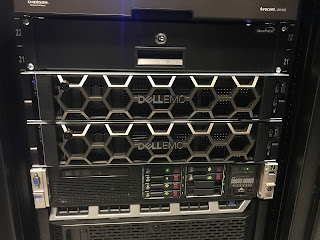
The past few weeks I've been busy deploying two new VDI severs for our Citrix XenDesktop environment to replace our existing two servers.  Before I get into that, lets go back to where this journey started and how I got here... The Beginning of my VDI journey Back in May 2014, after being introduced to NVIDIA GRID/vGPU, I started down a journey to architect a VDI solution for our Architecture and Landscape Architecture staff that would allow us to transition from huge, expensive, physical desktops to a more flexible, mobile, and consolidated system.  That journey started with a POC on XenServer with XenDesktop (it was the only one to support vGPU at the time) using a re-purposed HP DL380p G8 (being used as a VMware server host), which went through a couple different hardware iterations.  Final specs below: HP DL380p G8 2x Intel Xeon E5-2667 v2 @ 3.30 GHz (8 Core) 320 GB RAM 2x NVIDIA GRID K2 (4 GPUs on 2 boards) After nailing down the optimum CPU and GPU con...